
How to Create a Simple CV: Examples, Templates, and Tips
A simple CV is often the best way to get noticed. It's clear, easy to scan, and works well with applicant tracking systems (ATS). In this guide, you'll find basic cv examples, simple cv templates, and a checklist to help you build a clean, effective CV quickly.
What you’ll take away from this guide:
The must-have sections of a simple cv and how to write them
Simple CV Templates and basic cv examples you can use today
A checklist to build a simple cv quickly.
Pro tip
Before you start, gather your key details such as, personal information, work history, education, and skills. Having everything to hand makes the writing process much faster.
Why choose a simple CV format?
It’s easier for recruiters to skim in seconds
It’s applicant tracking system-friendly when formatted correctly
It focuses attention on your most relevant skills and results
It avoids design distractions that can reduce readability.
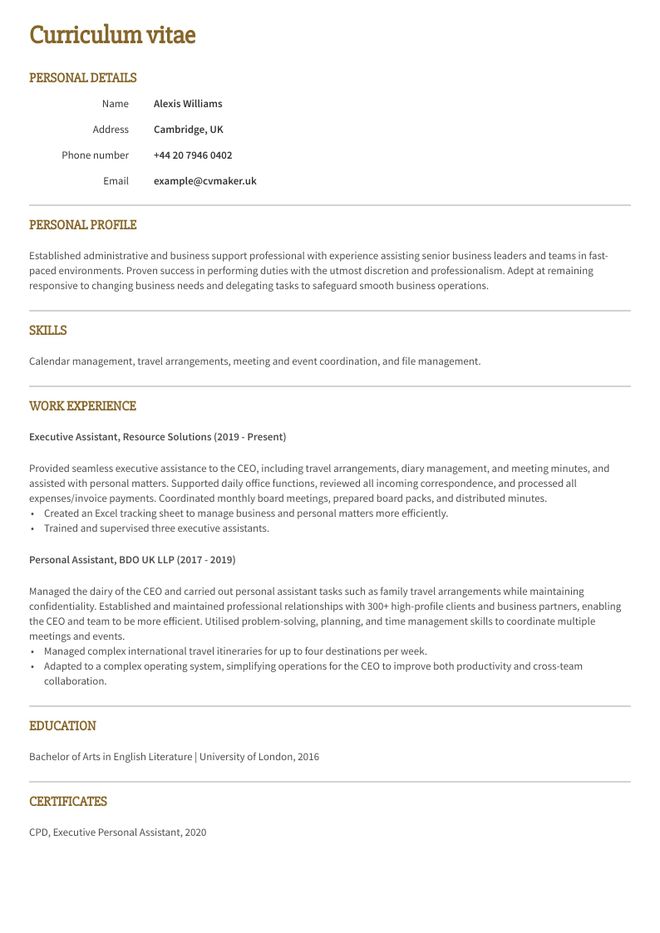
Simple CV sample
)
Download this simple CV sample in PDF for free.
Simple CV format tips
A well-formatted simple CV template is visually appealing and creates a positive impression on the reader. It demonstrates your attention to detail and professionalism. Moreover, proper formatting enhances the readability of your CV, allowing the reader to easily navigate through the document and find the information they need. Below you will find a few tips on how to format a CV with a simple layout and a few writing tips:
1. Highlight key sections
Using appropriate headings, bolding, or formatting techniques draws attention to key sections such as work experience, education, and skills.
2. Keep it professional and ensure attention to detail
It shows recruiters or hiring managers that you take the application process seriously and have put effort into presenting your qualifications and experiences in a clear and organised manner.
3. Use clear and concise language
Keep your language straightforward, avoiding unnecessary jargon or technical terms.
4. Maintain organisation and structure
Use clear section headings and maintain consistency in font styles, sizes, and formatting to help readers easily navigate your CV.
Pro Tip
A simple CV works well for most roles and experience levels, from first job CVs to senior applications.
4 best simple CV examples
For a good British CV example, steer clear of graphically heavy templates. Choose from our handpicked selection of straightforward and user-friendly basic CV templates. Take a look at a few examples below, which can be effortlessly utilised through our CV Builder.
Also interested in cover letters? Refer to how to write a simple cover letter.
1. Toronto simple CV template
)
2. Otago simple CV template
)
3. Oxford simple CV template
)
4. Princeton simple CV template
)

How to write a simple CV
Creating a CV isn’t always easy, as those few pages can decide if you progress to the first round of interviews. A professional CV template typically follows a standard structure. Follow these steps for a simple CV format for a job application:
Key CV sections to include:
Personal Details: Full name, address, phone number, email, and relevant links such as an online portfolio or LinkedIn profile.
Personal Profile: A concise summary highlighting your skills, experience, and career goals.
Work Experience: List current and previous jobs with job titles, company names, dates of employment, and key achievements.
Education: Include qualifications in reverse chronological order, mentioning institution names, degrees, and attendance dates.
Skills: Categorise skills as hard, soft, or technical, focusing on those relevant to the position.

Must-have CV sections
Personal profile
Skills section
Work experience
Education
Learn more about how to write a good CV.
1 .Personal profile
Your personal profile is a critical part of any CV, and due to its noticeable position, the recruiter will see it first. Your objective when writing a personal profile, also known as a summary, is to provide a brief overview of yourself, and the best way to do so is by focusing on your soft skills.
Here are a few examples to get you started:
Career change CV personal profile example
Motivated and adaptable professional seeking to transition into a new career, bringing a strong foundation of transferable skills gained through previous experience. Recognised for excellent communication, problem-solving, and organisational abilities, with a proven track record of learning quickly and thriving in new environments. Eager to apply existing strengths while developing new expertise and making a positive contribution to a forward-thinking organisation.
Personal profile example No Experience (Student / First Job)
Motivated and reliable individual eager to start a professional career. Quick to learn new skills, work well with others, and take on new challenges with a positive attitude. Strong communication and problem-solving abilities developed through education, volunteering, and personal projects. Committed to delivering quality work and continuously learning.
Entry level CV personal profile example
Proactive and detail-orientated professional with experience supporting day-to-day business operations in a fast-paced environment. Demonstrates strong organisational skills, adaptability, and a willingness to learn. Comfortable working independently and collaboratively to achieve team goals while delivering excellent customer service and maintaining high standards.
Mid-level CV personal profile example
An experienced professional with a proven track record of delivering high-quality results and contributing to business success. Skilled at managing multiple priorities, improving processes, and collaborating with cross-functional teams. Strong analytical, communication, and problem-solving abilities, with a focus on continuous improvement and achieving measurable outcomes.
Senior (8+ years) CV personal profile example
Strategic and results-driven professional with extensive experience leading projects, improving operational performance, and developing high-performing teams. Recognised for building strong stakeholder relationships, driving business growth, and delivering complex initiatives on time and within budget. Combines technical expertise with leadership skills to influence decision-making and achieve long-term organisational objectives.
Pro Tip
A simple CV template doesn’t compromise on quality, it focuses attention where it matters most and can still showcase your strengths and capabilities.
2. Work experience
List your work history starting with your most recent role. Include:
Job Title
Company Name
Location (optional)
Dates of Employment (e.g., Jan 2022 – Present)
Under each role, add 3–5 bullet points describing your key responsibilities and achievements.
Here is an example:
Customer Service Assistant, ABC Retail Ltd | London, UK, June 2023 – Present
Assisted customers with enquiries and resolved issues professionally.
Processed payments and handled cash accurately.
Maintained a clean and organised sales floor.
Worked collaboratively with team members to achieve daily sales targets.
Warehouse Operative, XYZ Logistics | London, UK, March 2021 – May 2023
Picked, packed, and prepared customer orders for dispatch.
Operated warehouse equipment safely and followed health and safety procedures.
Maintained accurate inventory records.
Helped improve efficiency by organising stock and work areas.
Tips for the work experience section in a CV:
Use reverse chronological order (most recent first).
Start each bullet with an action verb (e.g., Managed, Assisted, Created, Delivered, Improved).
Focus on achievements and impact, not just duties.
Keep descriptions concise; 1–2 lines per bullet.
If you have no work experience, include internships, volunteering, school projects, or extracurricular activities instead.
Read more about how to list your work experience in a CV.
3. Skills
A CV skills section should highlight the abilities that make you a strong candidate for the role. Include a mix of technical (hard) skills and personal (soft) skills, and tailor them to the job you're applying for. Aim to list 6–10 relevant skills.
Here are a few tips to make sure you list the right skills in a simple CV:
Include 6–10 skills that match the job description.
Combine hard skills (e.g., Excel, data entry, programming, graphic design) with soft skills (e.g., communication, teamwork, leadership).
Be honest – only list skills you can demonstrate.
Prioritise the most relevant skills for each application.
Avoid generic lists that don't relate to the role.
You can check out different CV examples in our extensive library to explore the best skills to add for a specific job.
4. Education
List your education in reverse chronological order (most recent first). Include:
Qualification
School, College or University
Dates Attended
Grades or achievements (optional)
For example:
Bachelor of Business Administration
University of Manchester
2021 – 2024
A Levels
Greenfield College
2019 – 2021
Tips for the education section in a CV:
Start with your highest or most recent qualification.
Include expected graduation dates if you are still studying.
Add relevant coursework, projects, or academic achievements if they strengthen your application.
If you have extensive work experience, keep this section brief.
Common mistakes to avoid
Now that you know what to include in your simple CV and how to present it, it's just as important to know what to avoid. Steering clear of these common mistakes will help your CV look more professional and improve your chances of getting noticed by employers.
Overloading one page with dense text: Keep your CV easy to scan with clear headings, bullet points, and plenty of white space.
Writing generic personal profiles: Avoid overused buzzwords and instead highlight your skills, experience, and achievements with specific examples.
Using inconsistent formatting: Keep fonts, spacing, headings, and bullet styles consistent throughout your CV.
Listing every job you've ever had: Focus on the experience that is most relevant to the role you're applying for.
Using graphics or complex layouts: Many applicant tracking systems (ATS) can't read graphics, icons, text boxes, or multi-column designs, so stick to a clean, simple layout.
CV checklist
)
Next steps?
Now that you know how to create a simple, effective CV, it's time to put your knowledge into practice. Use CVMaker's intuitive CV Builder to create a professional CV in minutes, choosing from a range of recruiter-approved templates designed to help you stand out.
FAQs
Who should use a simple CV template?
A simple template suits anyone who wants a clean, focused cv, whether you're a first-time jobseeker, a graduate, or an experienced professional. It works across most industries and experience levels.
Is a simple CV good when you have no work experience?
Yes. A simple layout lets you highlight your skills, education, and any relevant volunteer work or internships without drawing attention to limited work history in your CV.
What are the best templates for a simple CV?
Look for minimalist designs with clear section headings, consistent formatting, and a professional appearance. CVMaker's CV Templates include several simple options that are easy to edit and ATS-friendly.
Do recruiters like a simple CV?
Yes. Recruiters can quickly identify the information they need without being distracted by heavy design elements or unnecessary content.
What should be on a simple CV UK?
A UK CV should include personal details, a concise personal profile, work experience, education, and a skills section. Optional sections such as achievements or courses and certificates can be added where relevant.
What are the basic elements of a CV?
The core elements are personal details, a personal profile, work experience, education, and skills. These form the foundation of any effective simple curriculum vitae.
When to pick a simple CV template?
Choose a simple CV template when you want your content to do the talking. It's particularly effective for roles where clarity and professionalism matter more than visual flair.
How long should a simple CV be?
Aim for one page if you're a student or entry-level candidate. Experienced professionals can extend to two pages, but keep it concise; every line should earn its place.
What font should I use for a simple CV?
Use a clean, readable font such as Arial, Calibri, or Helvetica. Set body text to size 11 or 12 for easy reading on screen and in print.